0xFun CTF 2026 - UART
Write-up | 0xFun CTF 2026 | UART
Description
A strange transmission has been recorded. Something valuable lies within.
The link to the challenge’s artifact(s) is here.
Hash: 1be9fd338069ec3e62e2859e1323b893911b3ec11b0dfe155113aef933cba886 0xFunCTF2026_UART.zip
Initial steps
NOTE: Before doing this chall, I had not known much about UART. I recommend doing some research on UART, asking AI, or watching this video.
As usual, when I encounter an unusual file type, I will do file:

Maybe .sr extension is for something else, but in this case, the author may use .sr as a red herring. Actually, this is a zip file.
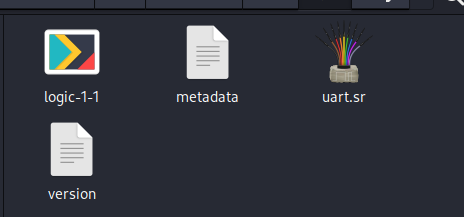
I unzipped it and it gave me three more files:
The metadata contains many valuable things.
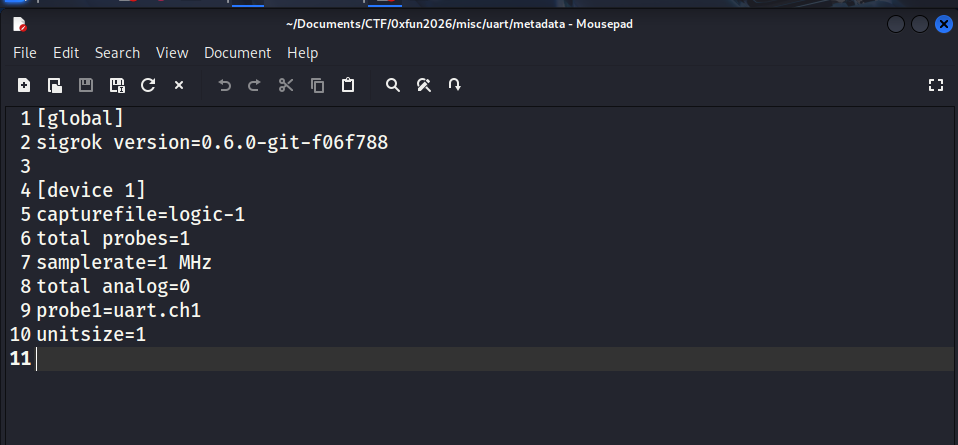
This is a Sigrok session file header (.sr). Sigrok is an open-source application used for digital analysis. Here’s a table of summary of what we found in the metadata:
Session parameters Value Meaning capturefile logic-1The raw binary data is stored in a file named logic-1within the session zip.total probes 1Only one digital channel was recorded (a.k.a only one wire was plugged into the circuit). samplerate 1 MHzThe device was capturing 1,000,000 samples per second (1 sample every $1\mu s$). total analog 0There’s no analog channels, only digital ones (0 and 1). probe1 uart.ch1The first probe is labeled as uart.ch1. This also proves that this probe is for a UART (Universal Asynchronous Receiver/Transmitter) signal.unitsize 1Each segment of data accounts for 1 byte of memory. This is also the standard setting.
On the contrary, the version file only has no information except a number. Not sure whether if it can help us.

Solution paths
Now we need to calculate the “baud rate” of this UART session. If we can know the baud rate, we can decode all of the data, like plaintext or commands, to see suspicious things behide the session.
There are five most popular default baud rate: 9600, 19200, 38400, 57600, 115200. You can bruteforce all of these, but I’ll approach this challenge more scientifically.
Now we execute this command:
sigrok-cli -i logic-1-1 -I binary:numchannels=1:samplerate=1000000 -A uart=rx > binary.txt
-i logic-1-1: The input is ourlogic-1-1file.-I binary:numchannels=1:samplerate=1000000: Set the input format as binary file;numchannelsis equal to thetotal probesparameter;samplerateis 1 MHz = 1 000 000 Hz.-A uart=rx:-Ais--annotate, which allow you to choose specify the data layer you want to output to the screen.uart=rxmeans the protocol is UART, and we need to collect information from the RX wire. Since there’s only one probe, you can useuart=tx(TX wire) as well (symmetry).> binary.txt: save the result in a.txtfile
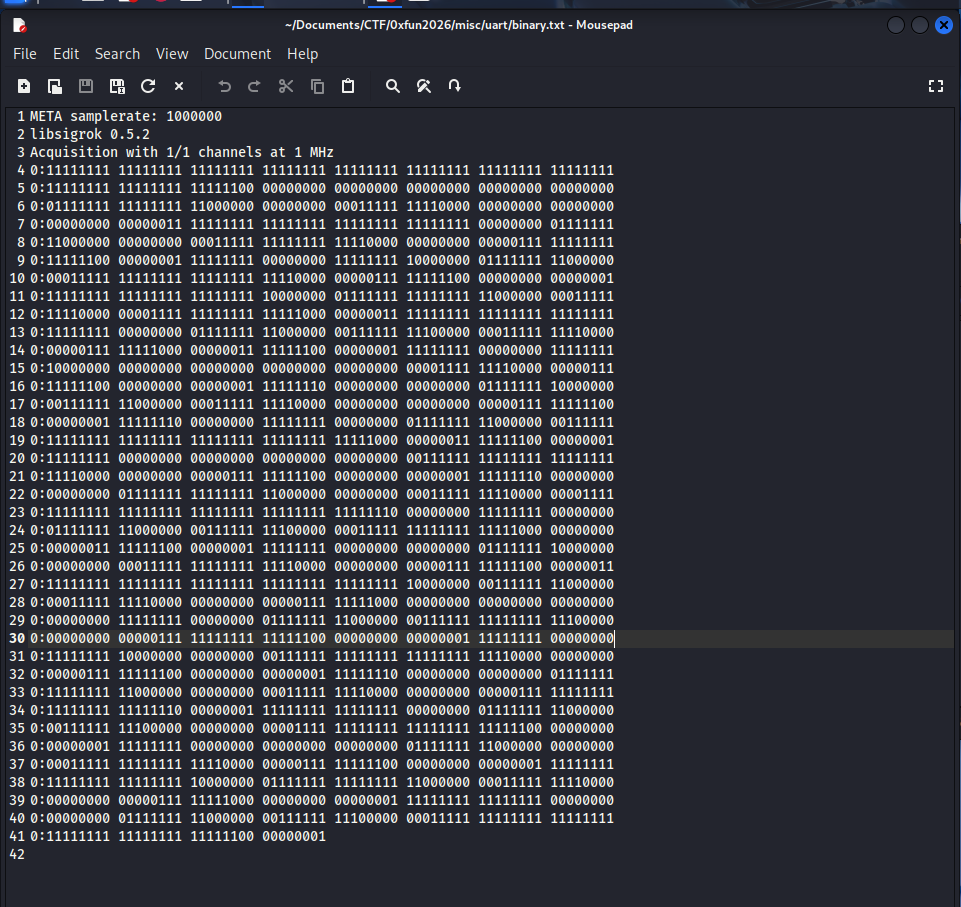
The first blocks of 1 bit means that the data is still not transmitted (at idle state), so we can skip this part.
At line 6, we have: 00011111 11110000, meaning there’s 9 consecutive 1 bits.
At line 7, we also get: 00000000 01111111, which contains 9 consecutive 0 bits.
Our samplerate, a.k.a $f$, is 1,000,000 Hz, which equals to $T = 1 \mu s$. It means each 0 or 1 that you read in the binary file represents exactly $1 \mu s$ in real scenario. From what we found at line 6 and 7, each bit lasts approximately $9 \mu s$.
Doing some maths, we have:
\[\text{Baud rate} = \frac{1,000,000}{9} \approx 111,111\]111,111 is kind of close to 115,200. I guess this is the baud rate.
We can end this challenge by doing:
sigrok-cli -i logic-1-1 -I binary:numchannels=1:samplerate=1000000 -P uart:baudrate=115200:rx=0 -A uart=rx-data
-P uart:baudrate=115200:rx=0: Set the baud rate and plug the only probe to the RX of the UART decoder.-A uart=rx-data: Set the output data to ASCII/HEX.
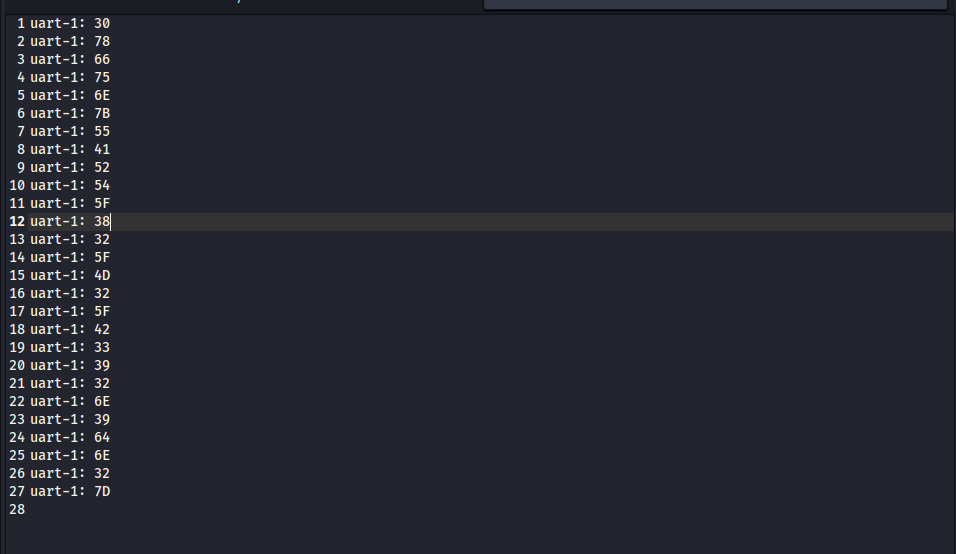
These are a bunch of HEX codes. Now we just need to use HEX decoder.
I exported the result to result.txt and execute:
grep -oE '[0-9a-fA-F]{2}$' result.txt
-oE:only-matchingand allowgrepto use special Regex.'[0-9a-fA-F]{2}$': Find exactly two characters that locate at the end of each line ($) and varies from numbers to letters.
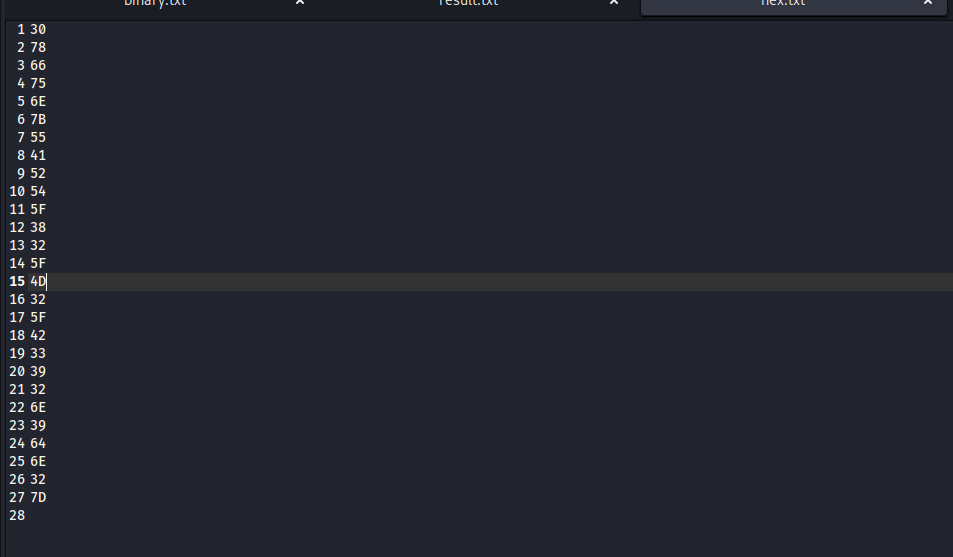
Use CyberChef and you can get the flag.
Flag
0xfun{UART_82_M2_B392n9dn2}
Commands/Tools used
Commands/Tools Purpose(s) sigrok-cliTo work with .srgrepFilter the necessary parts of plaintexts. CyberChef Decoding
What did we learn?
- We learn how a metadata file of
.srlooks like. - Know the sign to calculate the approximate baud rate, which is needed to extract information.