picoCTF 2022 - Torrent Analyze
Write-up | picoCTF 2022 | Torrent Analyze
Description
SOS, someone is torrenting on our network. One of your colleagues has been using torrent to download some files on the company’s network. Can you identify the file(s) that were downloaded? The file name will be the flag, like
picoCTF{filename}. Captured traffic.
Hint:
- Download and open the file with a packet analyzer like Wireshark.
- You may want to enable BitTorrent protocol (BT-DHT, etc.) on Wireshark. Analyze -> Enabled Protocols
- Try to understand peers, leechers and seeds. Article
The file name ends with
.iso
Initial steps
As you can see from the description or the title, this challenge is mainly related to torrent. Therefore, we will work with mostly torrent-related protocol packets.
There are four torrent protocols that should be enabled in Wireshark if we want to solve this challenge. Based on the 2nd hint, I recommend you to do what the hint tells first. Now let’s begin.
As a habit, I firstly took a look at the hierachy table of the traffic file.
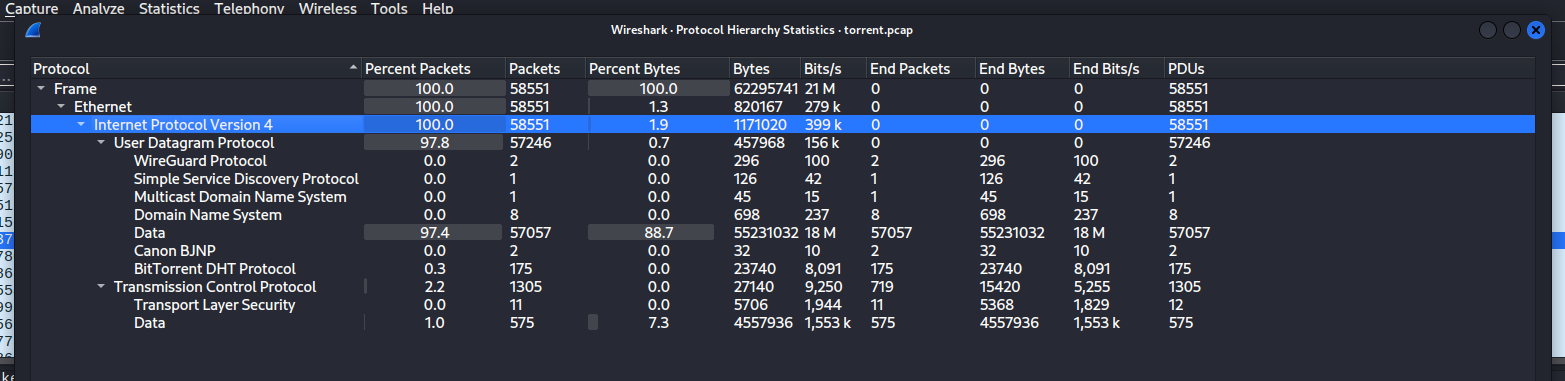
Only one protocol that is related to torrent in this table: BitTorrent DHT protocol. If you wonder what it actually is, I did some research and found a short summary:
“The BitTorrent DHT (Distributed Hash Table) protocol enables decentralized peer discovery and file sharing without the need for a central tracker, enhancing the efficiency and resilience of the BitTorrent network.”
Think it this way: This protocol allows you to find your “peers” (people who distribute the file to you) easier, without a man in the middle. We will mainly focus on this specific protocol.
Next, pay attention to this line of the description:
“One of your colleagues has been using torrent to download some files on the company’s network. Can you identify the file(s) that were downloaded?”
So we have to find the IP of the machine that captured this .pcap file. Usually, the main machine accounts for the most receiving traffics in the file.
To see which IP is the one that matches our categories, click Statistics -> Endpoints, then choose TCP and click the “Rx Bytes” column twice to sort the list in “Most received IP” order.

As you can see, address 192.168.73.132, at specifically port 59477, was the IP address that received most in this traffic file. This should be the main machine’s address.
I narrowed the scope to BT-DHT traffic sourced from 192.168.73.132 to analyze specific queries.
ip.src == 192.168.73.132 && bt-dht
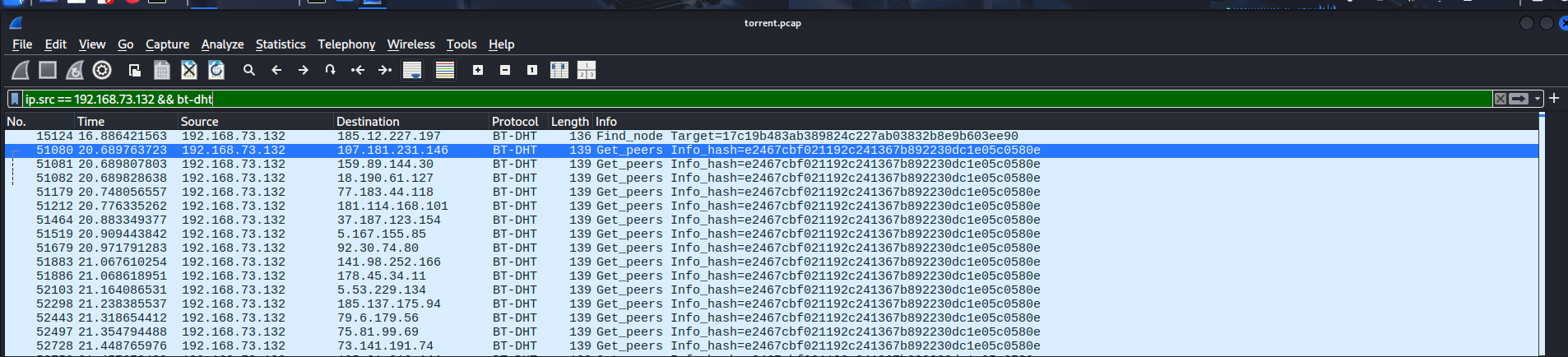
There were lots of traffic containing something called “Info_hash”. Looking up this keyword, I found out a brief description about this:
“An info hash is a unique identifier used in the context of torrent files and magnet links. It is a SHA-1 hash of the “info” dictionary within a torrent file. This hash serves as a digital fingerprint for the torrent, ensuring the integrity and authenticity of the files being shared.”
You can think “Info_hash” is an ID which is destined for a specific torrent file.
For certainty sake, I went a bit further in terms of filtering by adding contains "info_hash" right next to bt-dht.
ip.src == 192.168.73.132 && bt-dht contains "info_hash"
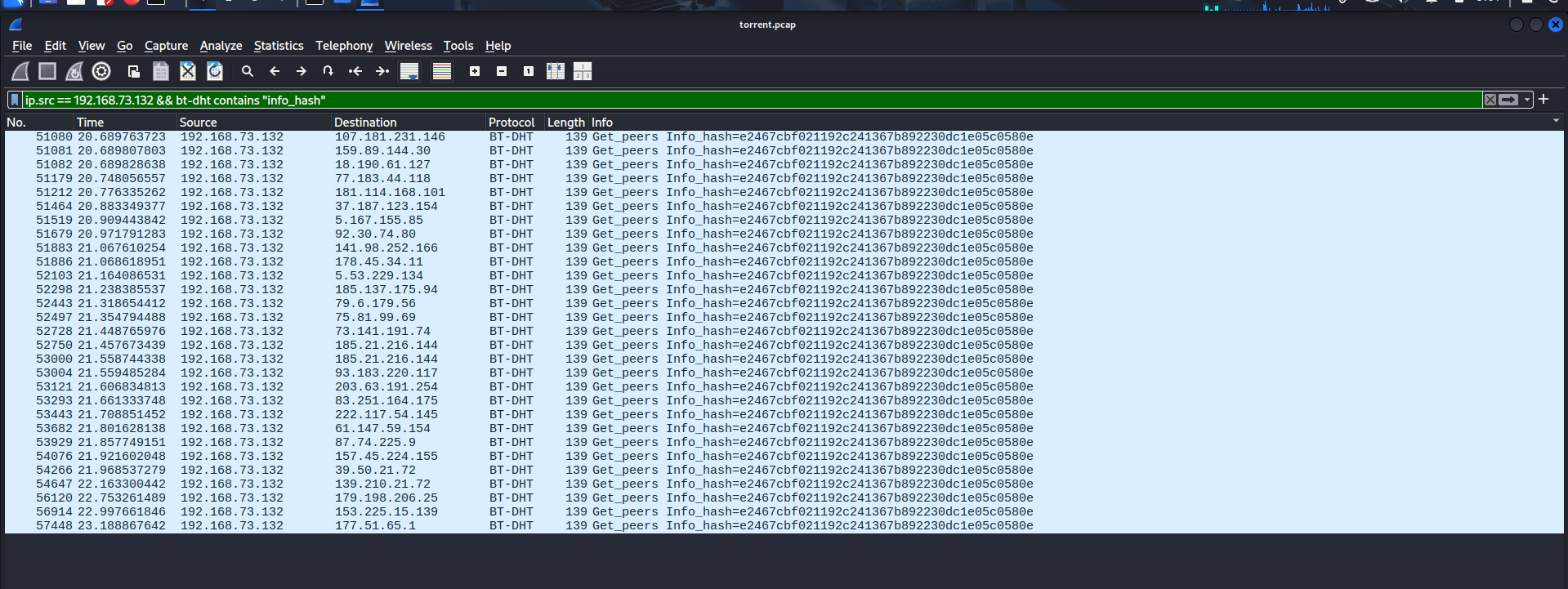
Seems like there’s only one Info hash, which means the main machine torrent-ly downloaded just a file. The found Info hash is e2467cbf021192c241367b892230dc1e05c0580e
Now we just need some tools to utilize this hash. Since this is the unique ID belonging to a file, if we know how to work with the hash, we may know information of the file, including the file name.
Solution paths
I luckily found out a website that let you look up Info hash and returns you the torrent metadata file. With this file, you can input it in your torrent application, and the download would start (only if there are seeds or peers).
https://hash2torrent.com/
Pasting the Info hash and click “Download metadata”, the website will take some time to search throughout the database and would return you the file if it matched any of the existing files.
After getting the metadata, you will need one more website to get the name of the mysterious file.
http://torrenteditor.com/
The name says it all: it allows you to edit the torrent metadata. This also acts as a metadata reader, since if the tool cannot read metadata file, then how it can help you edit the file?
Upload the downloaded file and click “Edit It!”, the name will be revealed.
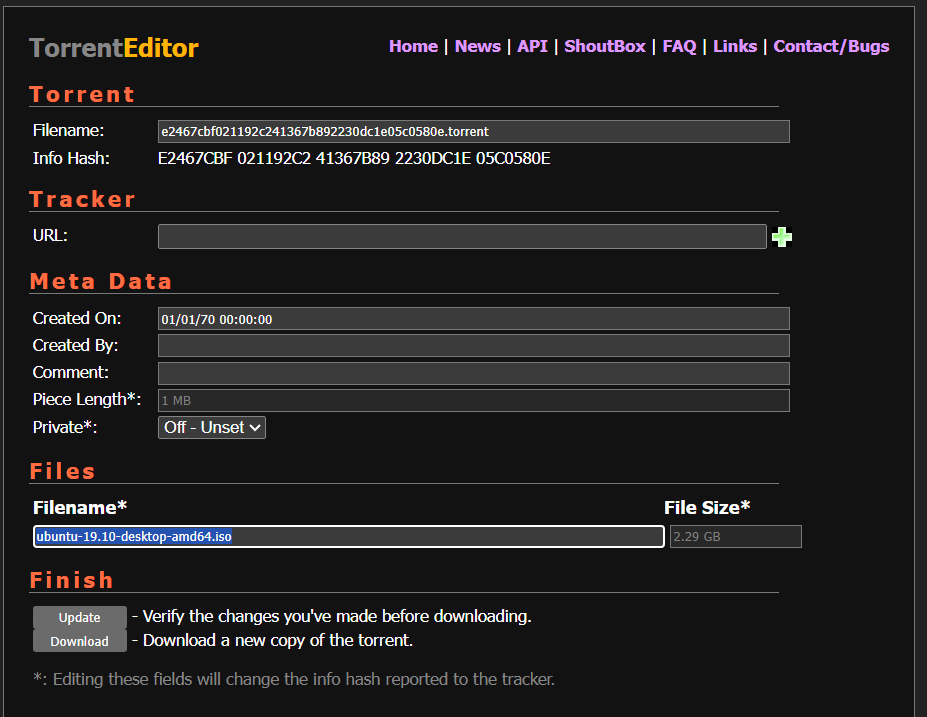
The file name is “ubuntu-19.10-desktop-amd64.iso”. This is the flag that we need.
Flag
picoCTF{ubuntu-19.10-desktop-amd64.iso}
Commands/Tools used
Commands/Tools Purpose(s) Wireshark A tool to analyse captured network packet ( .pcapand.pcapngfiles)https://hash2torrent.com/ Provide torrent metadata based on the inputted Info hash http://torrenteditor.com/ Display information from torrent metadata files and (maybe) allow editing on it.
Key takeaways/Lessons learned
- BitTorrent BT-DHT protocol: This protocol connects peers without a central tracker, making torrent downloading much more efficient.
- Unencrypted Info hash: Using public P2P protocols such as BT-DHT makes information about your download process insecure, allowing network administrators to monitor that intel.