picoCTF 2025 - RED
Write-up | picoCTF 2025 | RED
Description
RED, RED, RED, RED
Challenge file(s)/Infrastructure(s)
File(s):

Initial steps
We are provided a .png file. The first thing that I try to do is to use exiftool to check if the metadata has any useful information.
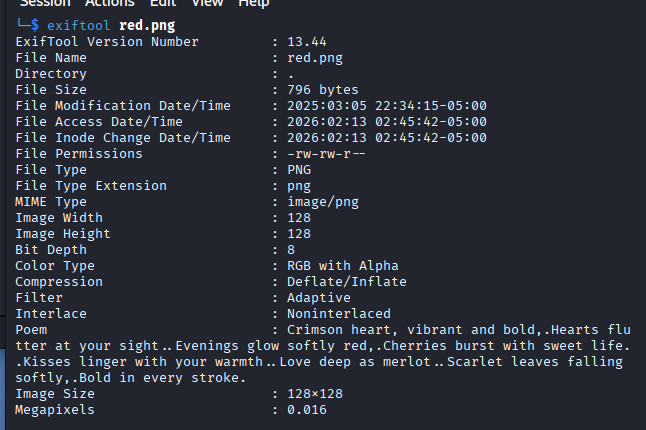
Crimson heart, vibrant and bold,
Hearts flutter at your sight.
Evenings glow softly red,
Cherries burst with sweet life.
Kisses linger with your warmth.
Love deep as merlot.
Scarlet leaves falling softly,
Bold in every stroke.
This is the poem that we got in the metadata. Take a closer look at each line’s first letter. It gives you an important sign: CHECKLSB.
Basically, this is a steganography challenge, which requires us to check the LSB (Least Significant Bit) for the flag.
Vulnerability analysis
Potential vulnerabilities
- Steganography (LSB)
Solution paths
When it comes to .png or .bmp, using zsteg is a must. I do zsteg RED.png and the result is a Base64 code:
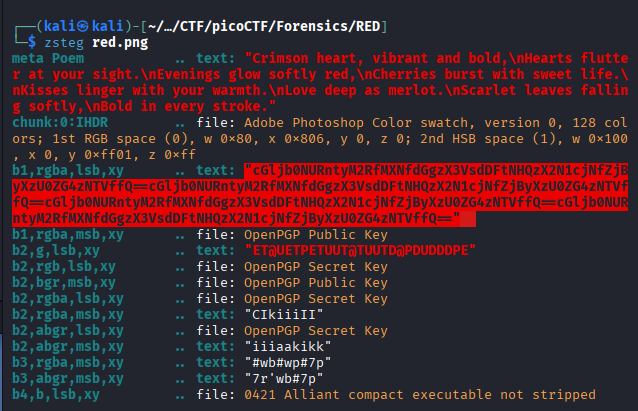
The text that I highlighted contains duplications of a Base64 code, so you do not have to copy the whole thing. The code is cGljb0NURntyM2RfMXNfdGgzX3VsdDFtNHQzX2N1cjNfZjByXzU0ZG4zNTVffQ==. Now we just need decode it.

You can also use CyberChef to decode.
Flag
picoCTF{r3d_1s_th3_ult1m4t3_cur3_f0r_54dn355_}
Commands/Tools used
Commands/Tools Purpose(s) exiftoolRead metadatazstegQuick scan an image for text or raw data (zip, elf)
What did we learn?
- We learned how LSB steganography works.
- Run
exiftoolto seemetadataandzstegfor quick hidden information extraction.