picoCTF 2022 - Operation Orchid
Write-up | picoCTF | Operation Orchid
The link to the challenge is here
Description
Download this disk image and find the flag.
Walkthrough
We also get a .img file like the previous challenge: Sleuthkit Apprentice. In case you haven’t read my write-up for that challenge, click here. You can follow the same process that I did in the last write-up, so I will skip those steps.
We will begin at the point after we did grep to find files that have the keyword “flag”:
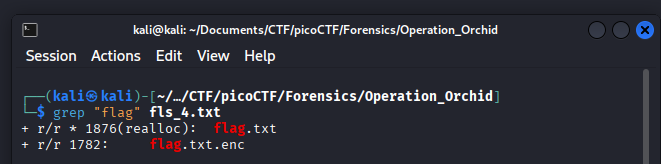
You can try icat the first file, but it won’t show anything valuable. Our focus is now on the second file, which has the extension .enc.
After a quick search, I know this file is encrypted and need some kinds of decryption to get the info. Still, we haven’t known what kind of encryption was done onto the file yet.
This leads me to explore the .ash_history file in the partition.
If you do not know what the file is used for, it works like a log: records all of commands that you executed on the Terminal.

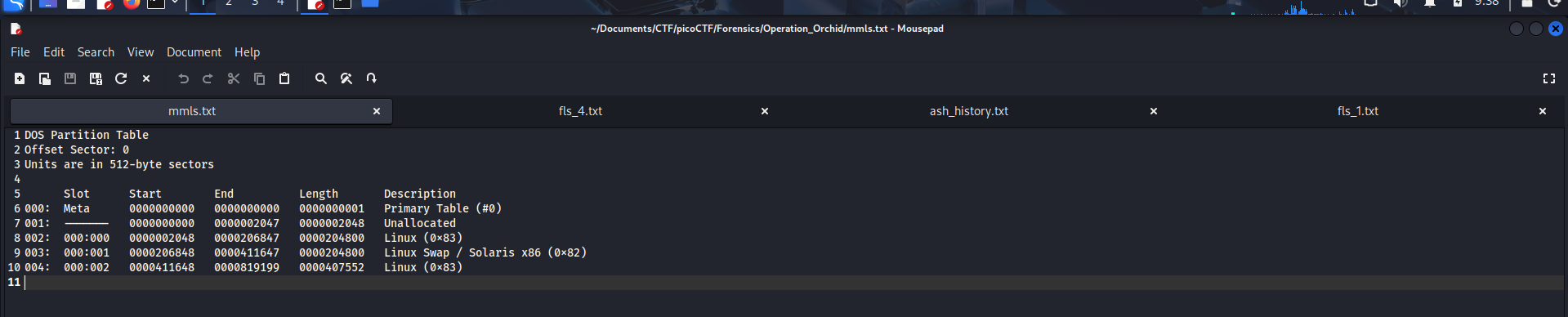
The inode-number of .ash_history is 1875, and the starting offset of the partition is 411648. Now we do icat with it:
icat -o 411648 disk.flag.img 1875 > ash_history.txt
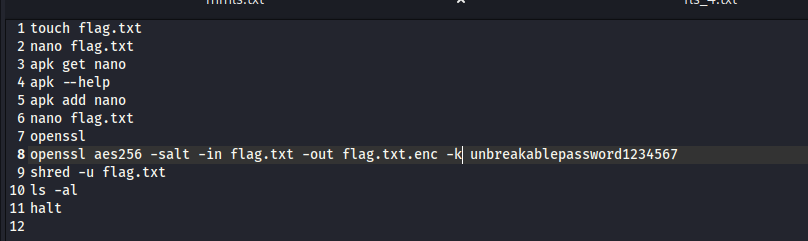
As you can see, the hacker used aes256 algorithm to encrypt the flag. Knowing this, we do:
icat -o 411648 disk.flag.img 1782 > enc to get the encrypted file out, and:
openssl aes256 -d -salt -in enc -out flag.txt -k unbreakablepassword1234567 to get the flag.
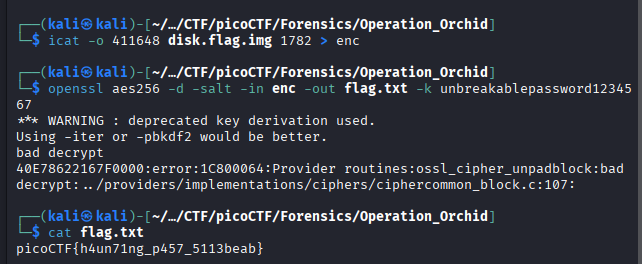
The flag is picoCTF{h4un71ng_p457_5113beab}