UTCTF2026 - Half Awake
Write-up | UTCTF 2026 | Half Awake
Description
Our SOC captured suspicious traffic from a lab VM right before dawn. Most packets look like ordinary client chatter, but a few are pretending to be something they are not.
Artifacts/Infrastructures
Artifacts
Solution paths
Opening the provided .pcap file, I firstly saw two HTTP packets:

Looking at the content of the response one, there were three hints to solve the challenge:
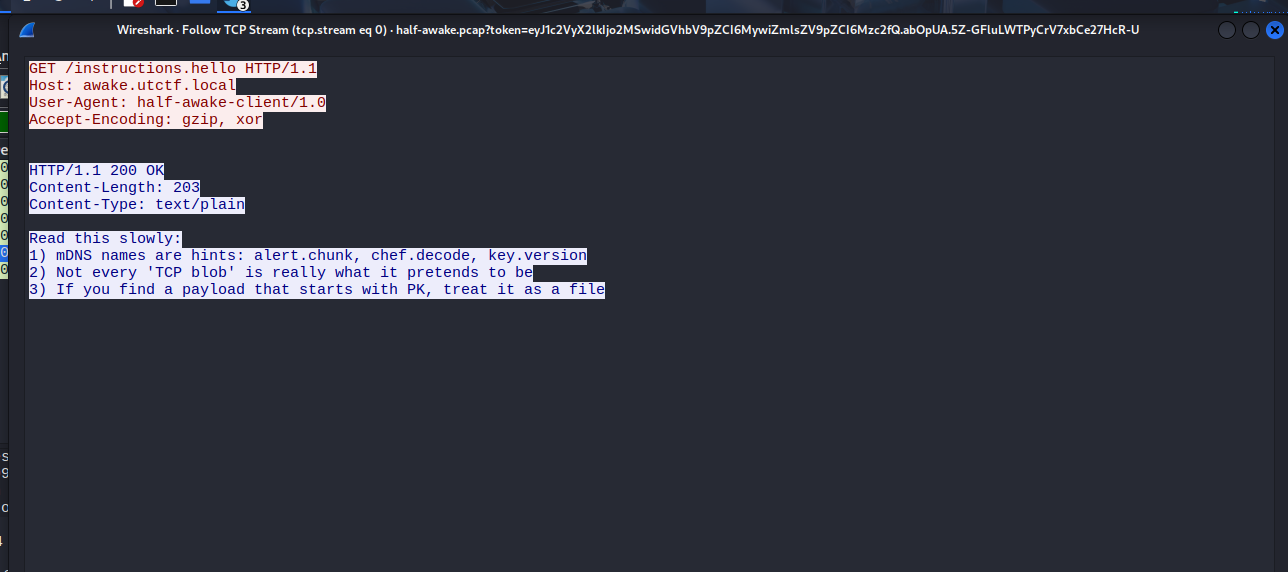
1) mDNS names are hints: alert.chunk, chef.decode, key.version
2) Not every ‘TCP blob’ is really what it pretends to be
3) If you find a payload that starts with PK, treat it as a file
For the first hint, I filtered MDNS protocol and found four packets. These were packets that the hint mentioned: alert.chunk, chef.decode, and key.version

I followed the first packet, and it showed that the first three packets were of the same session. However, I did not see anything special there:

On the other hand, the last packet - No. 11, actually had an interesting thing:

It contained a HEX code, which was 00b7. I suspected this was the key that attacker used to did XOR encoding.
In terms of alert.chunk and chef.decode, although there were no packet that had these terms and had data, I assumed they actually were hints.
alert.chunk: In TLS protocol, there is a type of packet called “Encrypted Alert”. This should be whatalertmeans.chunktells us that the file or flag that we need may not be in a single packet, but is divided into “chunks” and sent via various packets.chef.decode: It simply tells us to use CyberChef to decode.
Based on the thought that I made via alert.chunk, I filtered tls to narrow down the search. And just like my assumption, there was a TLSv1.2 packet with the text “Encrypted Alert” in the Info section:

Normally, TLS alert packet only has some bytes to report connection error, but this one had 365 bytes in length!
I took a look at the Packet Details Windows to see the protocols that this packet used, and turned out it should have been a TCP packet instead of fake TLS (just like what the second hint tell us):
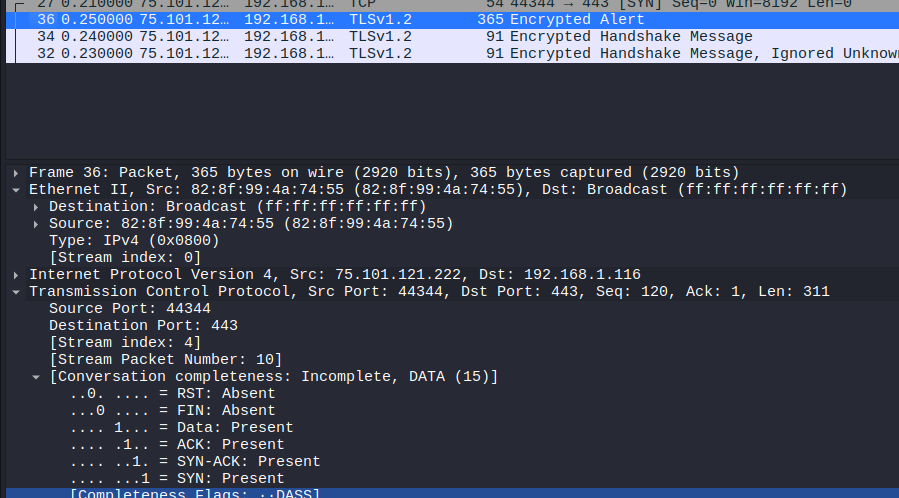
After that, I followed the TCP stream of the suspected packet and got the result like this:
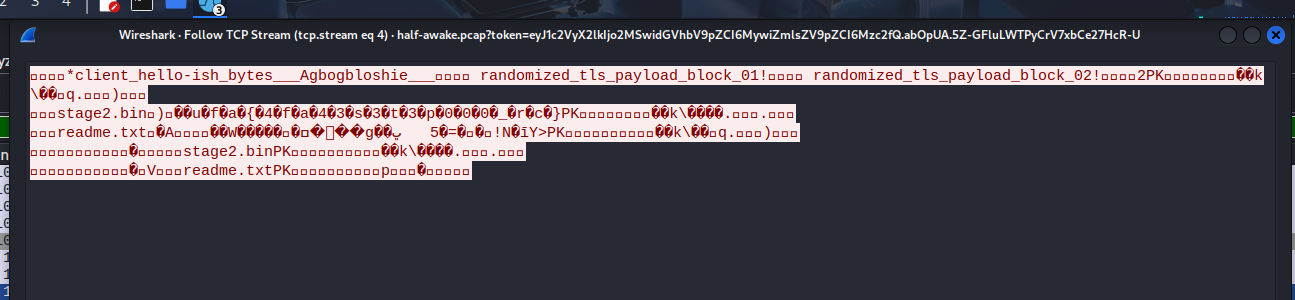
Perhaps the attacket sent two files: stage2.bin and readme.txt.
Let’s see the HEX dump of the session:
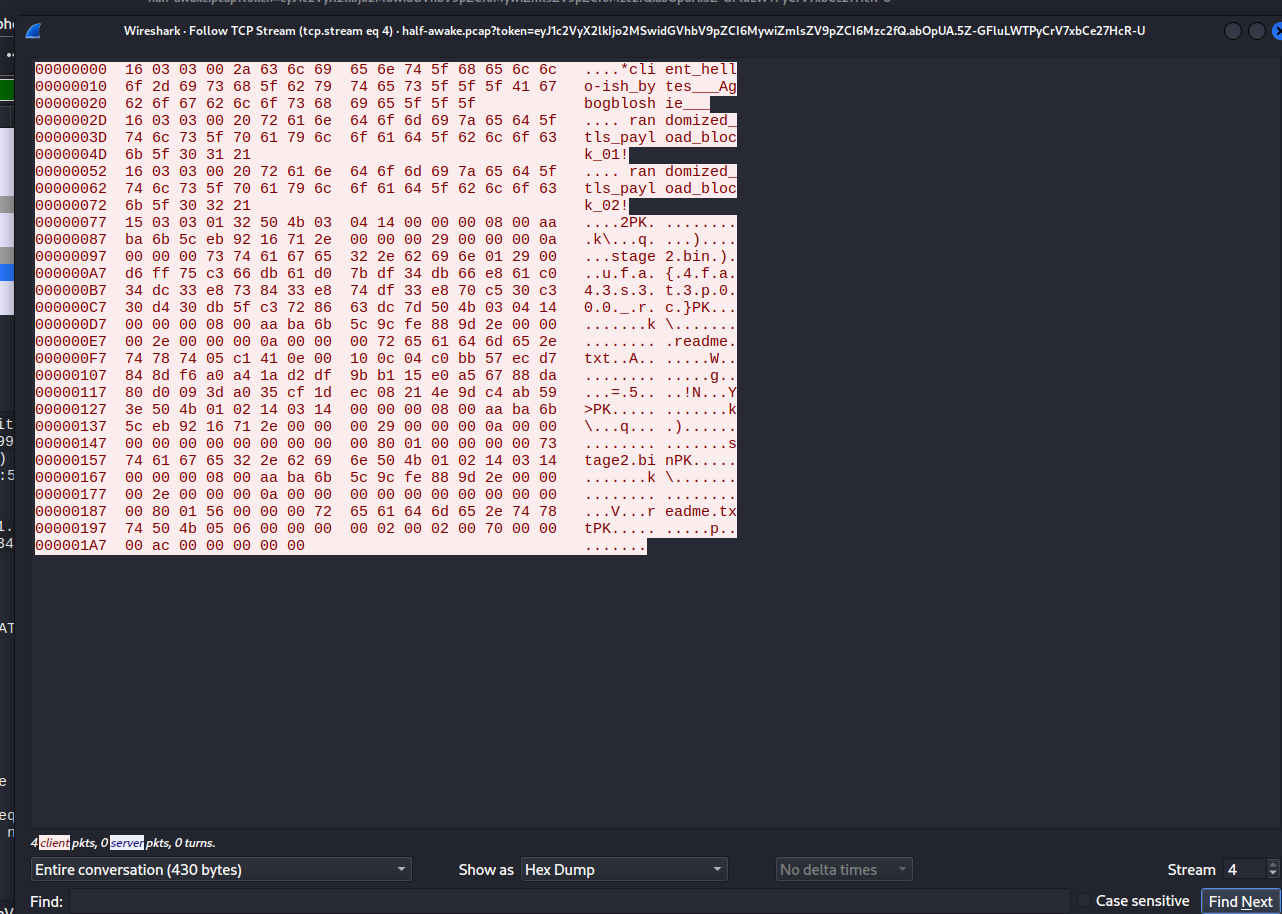
Now pay attention to the line in offset 0x77:

- Remember the third hint?
3) If you find a payload that starts with PK, treat it as a file
This payload had “PK”, so this is the file that we need.
15 03 03 01 32- The first 5 HEX couples15 03 03: These three are the TLS Record Header.15stands for the Content Type, which is “Alert”; while03 03stands for the Version, which is ver1.2.01 32: These tells the Length of the data behind. HEX 0x0132 = 306 (bytes).
A proof to prove that this was actually a TCP packet.
50 4b 03 04- ZIP’s magic bytes
This appeared right next to TLS Record Header, signalling that this is the start of the ZIP file.
The next step was to cut the Record Header part, save what behind it as ZIP file, and unzip.
Here I had a Python script to create the ZIP file:
1
2
3
4
5
6
7
8
9
import binascii

hex_data = "504b0304140000000800aaba6b5ceb9216712e000000290000000a0000007374616765322e62696e012900d6ff75c366db61d07bdf34db66e861c034dc33e8738433e874df33e870c530c330d430db5fc3728663dc7d504b0304140000000800aaba6b5c9cfe889d2e0000002e0000000a000000726561646d652e74787405c1410e00100c04c0bb57ecd7848df6a0a41ad2df9bb115e0a56788da80d0093da035cf1dec08214e9dc4ab593e504b01021403140000000800aaba6b5ceb9216712e000000290000000a00000000000000000000008001000000007374616765322e62696e504b01021403140000000800aaba6b5c9cfe889d2e0000002e0000000a0000000000000000000000800156000000726561646d652e747874504b0506000000000200020070000000ac0000000000"

with open("evidence.zip", "wb") as f:
    f.write(binascii.unhexlify(hex_data))

print("Done!")
Unzip the file, and you will have two more files and mentioned: stage2.bin and readme.txt.
We cannot read stage2.bin, but we can with readme.txt. Another hint was in this file:

Maybe beside XOR, we need to know other encoding techniques to get the flag in stage2.bin.
I utilized xxd to see HEX of that file, and the result was some kinds of text that just looked like a flag:

The text is “u.f.a.{.4.f.a.4.3.s.3.t.3.p.0.0.0._.r.c.}.
From here, I could tell that all the dots were encoded data, and characters that were not dots were plaintext data. Notice that dots only appeared in even-number position.
Here is the Python script to get the flag:
1
2
3
4
5
6
7
8
9
10
11
12
13
14
# Hex
hex_data = "75c366db61d07bdf34db66e861c034dc33e8738433e874df33e870c530c330d430db5fc3728663dc7d"
raw_bytes = bytes.fromhex(hex_data)

key = [0x00, 0xb7] # 0x00 is to XOR with odd-number position, while 0xb7 is the key we found - to XOR with even-number position
flag = ""

for i in range(len(raw_bytes)):
    # i % 2 alternates between 0 and 1 to select key 0x00 or 0xb7.
    decoded_char = chr(raw_bytes[i] ^ key[i % 2])
    flag += decoded_char

print(f"The flag is: {flag}")
Run the script, and there you have it:

Flag
utflag{h4lf_aw4k3_s33_th3_pr0t0c0l_tr1ck}
Commands/Tools used
Commands/Tools Purpose(s) Wireshark A tool to analyse captured network packet ( .pcapand.pcapngfiles)CyberChef A web-based “Cyber Swiss Army Knife” used to decode, decompress, and transform diverse data formats through a modular “recipe” interface. xxdA command-line utility used to generate hex dumps of binary files or convert hexadecimal text back into its original binary format. Python A versatile scripting language used to automate complex data manipulation and implement custom decryption logic for processing raw bytes.
Key takeaways/Lessons learned
- Not all packets are what they should be: As you can see, the TLS alert packet can be used as TCP packet to send data, allowing the hidden payload to slip past security filters and firewalls by hiding within the noise of standard, innocent-looking protocol communications.
- Anomaly detecton: Always monitor for anomalies like packet size. A 365-byte TLS Alert is a massive red flag since standard alerts are only 2 bytes long.
- The Power of Data Correlation: Cross-protocol correlation is essential. In this challenge, the key was sent via mDNS, and the payload was sent via TLS. In real-life scenarios, modern threats usually split their logic across various protocols to evade detection.
- Magic Bytes Over Extensions/Headers: Do not always trust the metadata that OS provides to the file, or Wireshark gives to captured traffic file. Detecting the ZIP file magic bytes behind TLS Record Header is the key in this challenge.